
Mac Junk Cleaner
Remove junk files and free up disk space instantly
Overview
Quick Clean is your go-to solution for instant Mac optimization. With a single click, it scans your entire system and identifies all the junk files that are slowing down your Mac and taking up valuable storage space.
Unlike traditional cleaning tools that take forever to scan, Quick Clean uses intelligent algorithms to rapidly identify and categorize unnecessary files. It targets system caches, application caches, logs, temporary files, and other junk that accumulates over time.
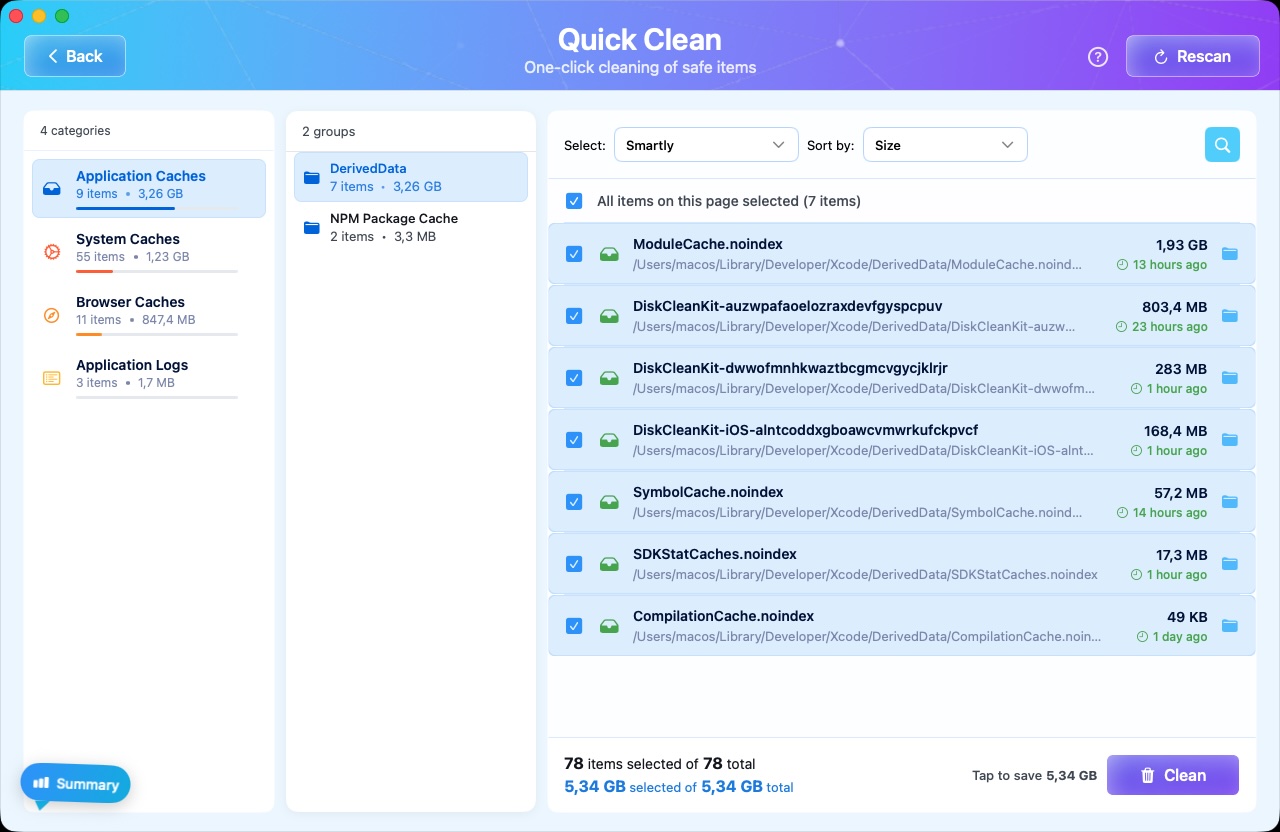
The scan results are presented in a clear, organized interface that shows you exactly what will be cleaned and how much space you'll recover. You have full control - review the files before cleaning or trust Quick Clean to safely remove them all.
Key Benefits
Lightning Fast Scanning
Complete system scan in under a minute. No more waiting around for slow scans to finish.
Safe & Secure
Only removes files that are safe to delete. Your important documents and system files are never touched.
Detailed Results
See exactly what files will be removed with size breakdowns by category before you clean.
One-Click Cleaning
Clean all identified junk files with a single click. No complex settings or technical knowledge required.
Regular Maintenance
Run Quick Clean weekly to keep your Mac running smoothly and prevent storage from filling up.
Space Recovery
Recover valuable storage space on your first scan. Results vary based on usage.
How It Works
Launch DiskCleanKit
Open DiskCleanKit from your Applications folder or Launchpad. The app launches instantly with a clean, intuitive interface.
Click Quick Scan
Select the Quick Scan option from the main dashboard. The scan begins immediately and typically completes in under 60 seconds.
Review Results
View the scan results organized by category - System Cache, Application Cache, Logs, Temporary Files, and more. Each category shows the total size that can be recovered.
Clean with Confidence
Click the Clean button to remove all identified junk files. You can also expand categories to review individual files before cleaning.
Enjoy More Space
Your Mac now has more free storage space and may even run faster without all that accumulated junk slowing it down.
See It in Action


Pro Tips
Run Quick Clean once a week to maintain optimal Mac performance and prevent storage buildup.
Close applications before scanning to ensure their cache files are fully detected.
Check the scan results breakdown to understand which apps are generating the most cache.
Quick Clean is safe to run frequently - it only removes files your system can regenerate.
Try Mac Junk Cleaner Today
Download DiskCleanKit and experience the power of mac junk cleaner for yourself.