
Understanding MCP: The Universal Protocol Connecting AI to Your World
What is Model Context Protocol (MCP)?
Model Context Protocol (MCP) is an open-source standard that's revolutionizing how AI applications connect to the world around them. Think of it as the USB-C for AI — just as USB-C provides a universal way to connect devices, MCP provides a standardized way to connect AI assistants to external tools, data sources, and applications.
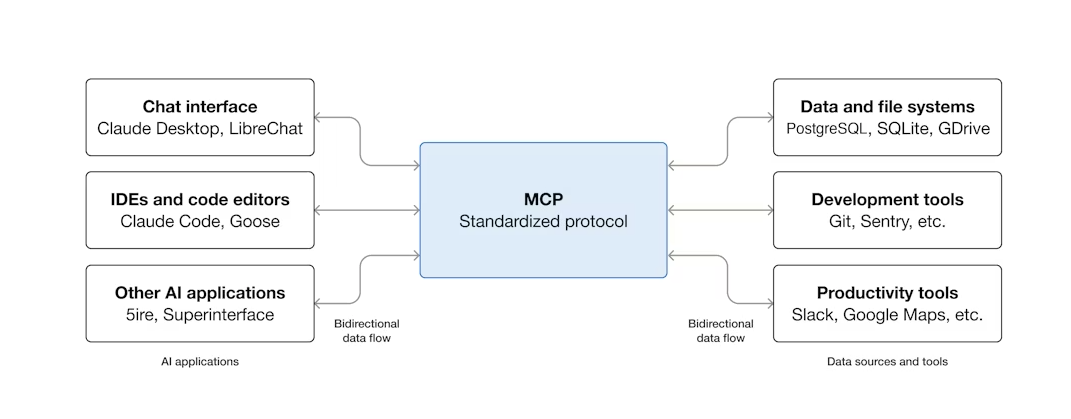
*Image source: modelcontextprotocol.io*
Before MCP, every AI integration required custom code. Want Claude to access your files? Write custom code. Want ChatGPT to query your database? More custom code. MCP changes this by providing a universal protocol that works across all AI applications and all data sources.
Why MCP Matters
The Problem MCP Solves
Traditional AI assistants are limited to what they know from training data. They can't:
- Access your local files
- Query your databases
- Control your applications
- Interact with real-time data
MCP breaks down these barriers by creating a standardized bridge between AI and external systems.
Key Benefits
| Benefit | Description |
|---|---|
| Universal Compatibility | One protocol works with Claude, ChatGPT, and other AI assistants |
| Reduced Development Time | No more custom integrations for each AI service |
| Enhanced AI Capabilities | AI can now access real data and take real actions |
| Secure by Design | Built-in security and permission models |
How MCP Works
MCP follows a simple client-server architecture:
Core Components
1. MCP Clients — AI applications (like Claude, ChatGPT) that consume services
2. MCP Servers — Applications that expose data, tools, and workflows
3. Transport Layer — Communication channels (stdio, Streamable HTTP)
What MCP Can Provide
| Component | Description | Example |
|---|---|---|
| Tools | Functions AI can call | Run a disk scan, search files |
| Resources | Data AI can access | File contents, database records |
| Prompts | Specialized instructions | Cleaning recommendations |
| Sampling | Model interaction requests | Context-aware suggestions |
Real-World Applications
1. Personalized AI Assistants
AI can access your calendar, notes, and files to provide truly personalized help. Imagine an AI that knows your schedule, your projects, and can help you manage your day.
2. Design-to-Code Workflows
Claude Code can generate entire web applications by connecting to Figma designs through MCP, transforming visual designs into working code.
3. Enterprise Data Analysis
Organizations can connect AI chatbots to multiple databases, enabling natural language queries across all company data.
4. Smart Home & IoT
AI can create 3D designs and send them directly to 3D printers, control smart home devices, and interact with the physical world.
The MCP Registry
The MCP Registry serves as a central directory for discovering MCP servers. It's a metaregistry that hosts metadata about available servers rather than the actual code.
Finding MCP Servers
The registry helps you discover:
- Community servers — Built by developers worldwide
- Official servers — From Anthropic and partners
- Industry-specific tools — For various domains
Deployment Options
| Method | Description |
|---|---|
| Package-based | NPM, PyPI, Docker containers |
| Remote Services | Streamable HTTP endpoints |
| Hybrid | Combination of local and remote |
Security & Authentication
MCP takes security seriously with:
- Namespace verification — Servers are verified via GitHub OAuth or DNS
- Permission models — Fine-grained control over what AI can access
- Audit logging — Track all AI interactions with your data
Getting Started with MCP
For Developers
1. Explore the Registry — Visit modelcontextprotocol.io to discover available servers
2. Build a Server — Create MCP servers to expose your tools and data
3. Build a Client — Develop applications that connect to MCP servers
For Users
1. Enable MCP in your AI app — Claude Desktop and other apps support MCP
2. Install MCP servers — Add servers for the tools you need
3. Enjoy enhanced AI — Your AI assistant can now do more
The Future of AI Integration
MCP represents a fundamental shift in how we interact with AI. Instead of AI being a separate tool, it becomes integrated into our entire digital workflow. The protocol is:
- Open Source — Community-driven development
- Extensible — Easy to add new capabilities
- Growing — Ecosystem expanding rapidly
Community & Support
MCP is maintained by key contributors from Anthropic, GitHub, and the open-source community. Development happens through:
- GitHub discussions and issues
- Discord community
- Regular updates and improvements
What This Means for Mac Users
For Mac users, MCP opens exciting possibilities:
- AI that understands your file system
- Smart automation of routine tasks
- Intelligent cleanup recommendations based on actual usage patterns
- Seamless integration between AI assistants and Mac applications
---
Available Now: DiskCleanKit v5.0 supports MCP integration, allowing AI assistants like Claude to interact with the app for intelligent, context-aware cleaning recommendations directly on your Mac.
Ready to Clean Your Mac?
Try DiskCleanKit today and reclaim your disk space. One Touch Clean, Widgets, Disk Manager, and more.